Account
Notification settings
Email frequency and integration push.
Drentio sends three kinds of notifications: transactional (must-receive), product updates (nice-to-know), and module alerts (event-driven, configurable).
Where to manage them
drentio.com/account/notifications — every preference, one page.
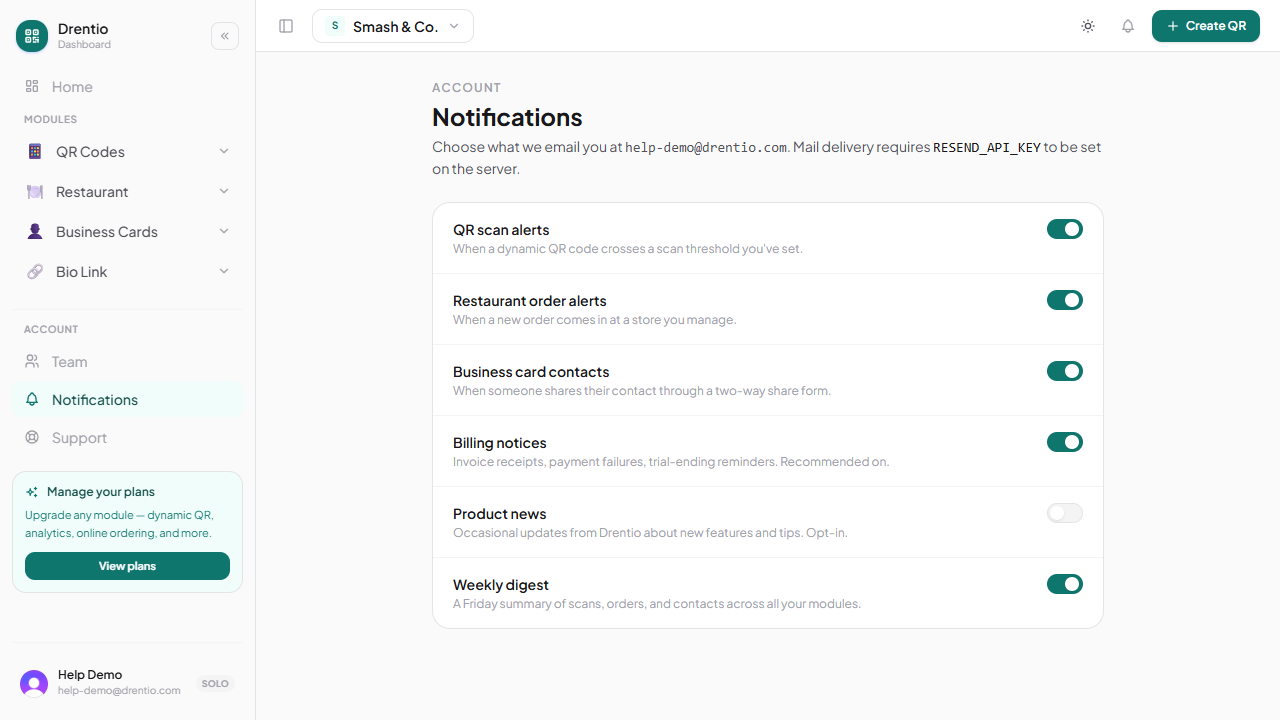
What you can configure
Email frequency
| Type | Default | Options |
|---|---|---|
| Order received (Restaurant) | Immediate | Immediate / hourly digest / daily digest / off |
| Lead captured (BC) | Immediate | Immediate / daily digest / off |
| Email signup (Bio Link) | Daily digest | Immediate / daily / weekly / off |
| Scan-spike alert (QR) | Off | Threshold-based (50 / 100 / 500 in 1h) |
| KDS sound chime | On | On / off (per-device) |
| Weekly summary | On | On / off |
| Product newsletter | On | On / off |
In-product alerts
The bell icon top-right shows un-read alerts: new orders, new leads, plan limit warnings, billing failures. Click to mark read; "Mark all read" clears the badge.
Integration push
If you've connected Slack, Discord, or a webhook, you can push specific events there:
- Orders → Slack channel
#kitchen - Leads → Slack channel
#sales - Survey responses → Slack channel
#feedback - Billing failures → email + Slack
Configure each: Account → Notifications → Integrations.
What you can't turn off
For legal + safety reasons, these always send:
- Password reset
- Email verification
- Billing failure (your card got declined)
- Plan cancellation confirmation
- Security incidents affecting your account
Per-device controls
Some alerts are device-local, not account-level:
- KDS chime — toggled on each kitchen tablet independently
- Hot Actions bell — same, toggled per device
This lets the kitchen tablet have sound on while the bar tablet is silent.
The daily digest is underrated. If you're getting too many "ping" emails, switch order / lead notifications to daily digest. You see all the day's activity in one email at 9 PM. Far less stressful than 40 individual pings.
Plan note
- Email + in-product: Free
- Slack / Discord push: Pro+
- Custom webhook + threshold-based alerts: Business / Premium