Bio Link
All block types
Links, headers, video embeds, contact forms, products.
Free
Bio Link pages are built out of blocks. Stack them top-to-bottom. Each block has its own settings — schedule, theme override, click tracking.
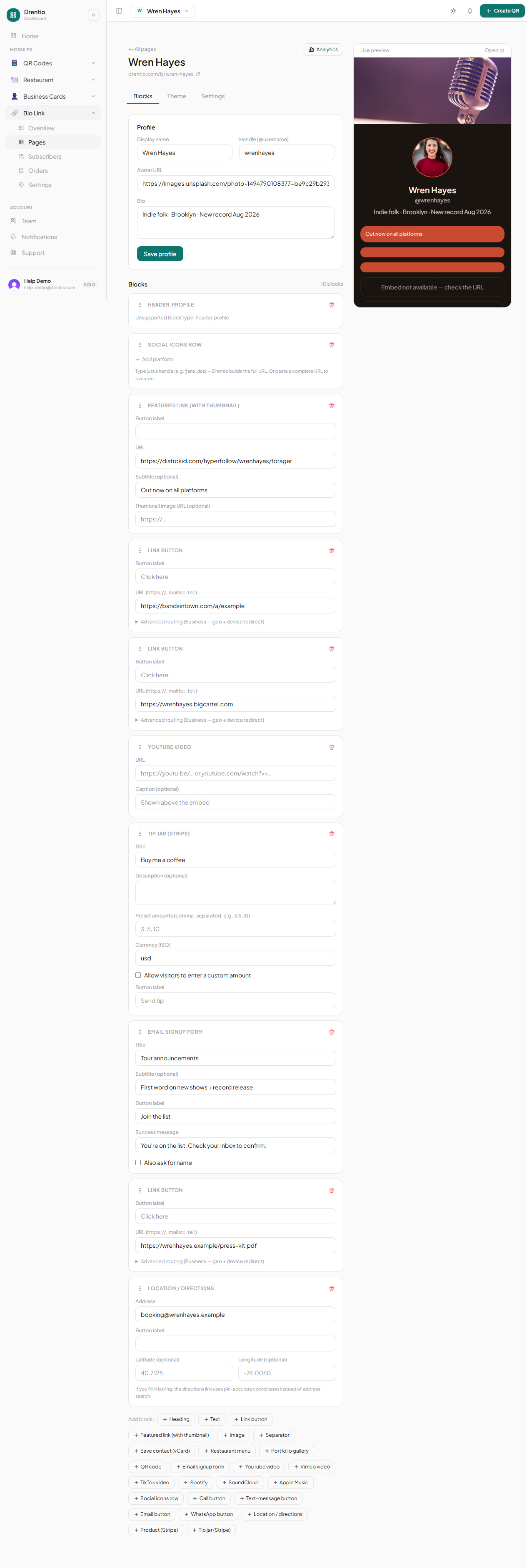
The block catalog
Header
| Block | Use it for |
|---|---|
header.profile | Avatar + name + tagline — every page should start here |
header.banner | Full-bleed image background with text overlay — strong visual brand |
Links
| Block | Use it for |
|---|---|
link.button | Standard tappable button — your bread-and-butter |
link.featured | Bigger, image-led card — the "hero" link of the page |
link.list | Group of related links under one heading |
Social
| Block | Use it for |
|---|---|
social.row | Icon row — IG / TikTok / YT / X / etc. |
social.embed | Live latest Instagram post or TikTok video |
Media
| Block | Use it for |
|---|---|
embed.video.youtube | Inline YouTube player |
embed.video.vimeo | Inline Vimeo player |
embed.spotify | Spotify track / playlist / podcast embed |
embed.audio | Audio file (mp3) with native player |
Commerce (Pro+)
| Block | Use it for |
|---|---|
commerce.product | Single product → checkout via your connected processor (Stripe today; see Payment processors) |
commerce.tip-jar | Pick-an-amount tipping |
commerce.gift-card | Sell gift cards |
Forms
| Block | Use it for |
|---|---|
form.email-signup | Capture emails for newsletter |
form.custom | Multi-field form (name + message + custom) |
Contact
| Block | Use it for |
|---|---|
contact.location | Address + embedded map |
contact.hours | Opening hours table |
contact.phone | Tap-to-call button |
contact.vcard | Save-to-contacts button (uses your card) |
Adding a block
Step 1 — Tap + Add block
In the page editor, after the last block.
Step 2 — Pick a category, then a block
Eight categories above; pick the one matching what you need.
Step 3 — Fill the block's fields
Each block has its own. Most need just a title + a target (URL or content).
Step 4 — Drag to reorder
Long-press the block handle on the left. Drag anywhere in the page stack.
One commerce block = good. Three commerce blocks = bad. Bio pages convert best when there's one clear primary action. Stack educational / social blocks on top, then one "buy" block as the climax.